I2BRT
Ham Radio Site
Auto QRZ Utility for N1MM
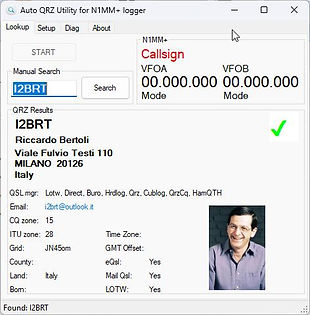
Purpose
Auto QRZ Utility for N1MM+ automatically retrieves callsign information from the QRZ.com XML service whenever a callsign is entered in N1MM+. It provides fast access to operator details, station information, and optional profile images without leaving the logging software.
Usage
Download the EXE file and place it anywhere on your computer. No installation is required. Launch the program, enter your QRZ XML credentials, configure the N1MM+ UDP port, and click Start. Once connected, callsigns entered in N1MM+ will be automatically looked up and displayed in real time.
Note
This is a small utility developed primarily for my own operating needs and personal use. It is provided free of charge and without any warranty. The author assumes no responsibility for software malfunctions, incorrect information, data loss, equipment issues, or any consequences arising from its use. Use it entirely at your own risk. If you no longer need the program, simply delete the EXE file—there is nothing to install or uninstall.